

Connectivity
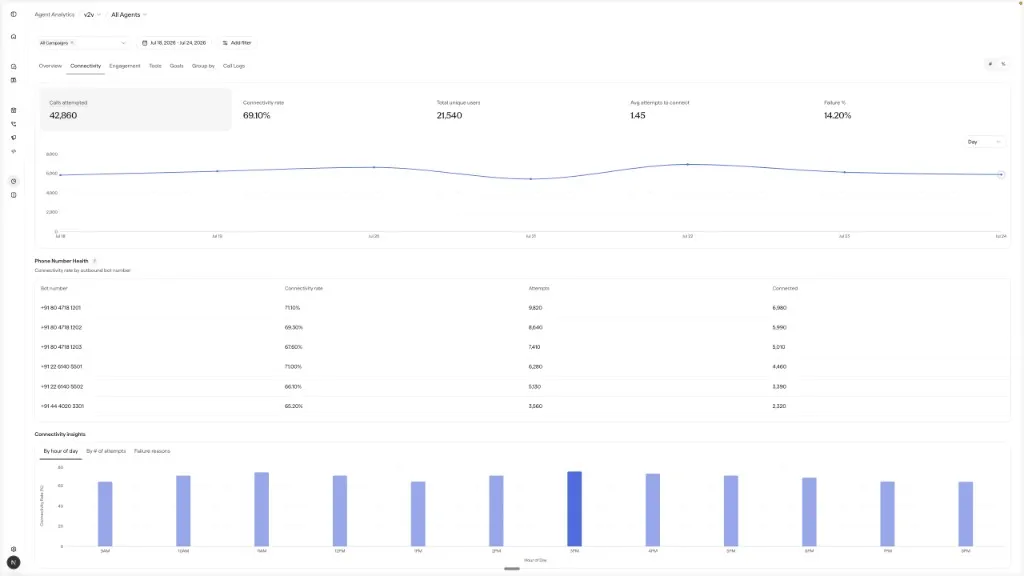
Connectivity is a tab under Monitor → Agent Analytics. It answers a single question: are your dials reaching people? The tab reports how reliably dial attempts turn into connected calls, which lets you separate a reachability problem from a conversation-quality problem.
Open this tab when calls are not being answered, rather than when the agent is handling conversations poorly. To investigate conversation quality after a connect, use Engagement.
When to use Connectivity
Connectivity is most useful when:
- The connectivity rate is falling while attempts stay high.
- One bot number is underperforming the others.
- It takes too many dials to reach a single connect.
- Failures cluster around credits, DND, busy, or carrier errors.
KPI tiles
Each tile summarizes the selected period. Use the # / % toggle to switch rate tiles between count and percentage.
Charts and insights
Trend
Phone Number Health
Insights
A time series for the selected KPI. Granularity can be set to Day, Week, Month, or Quarter.
How to investigate
Check the rate before the volume
High attempts with a falling connectivity rate usually point to number health, timing, or provider issues rather than prompt quality.
Use the insights views
The hour-of-day and attempt-count breakdowns show whether to adjust dial windows or retry policy.
Sample failed rows in Call Logs
Open Call Logs, keep the same filters, and review the Failure Reason on a few examples.