
Phone Numbers

View as Markdown

Telephony is how your agents make and receive phone calls.

Before your agent can pick up or dial a phone, you need phone lines. These come from a telephony provider (for example, Exotel or Twilio), which supplies the phone numbers and carries the calls. You can connect a provider account you already have, or rent one or more numbers directly from Sarvam.

Open Deploy → Phone Numbers.
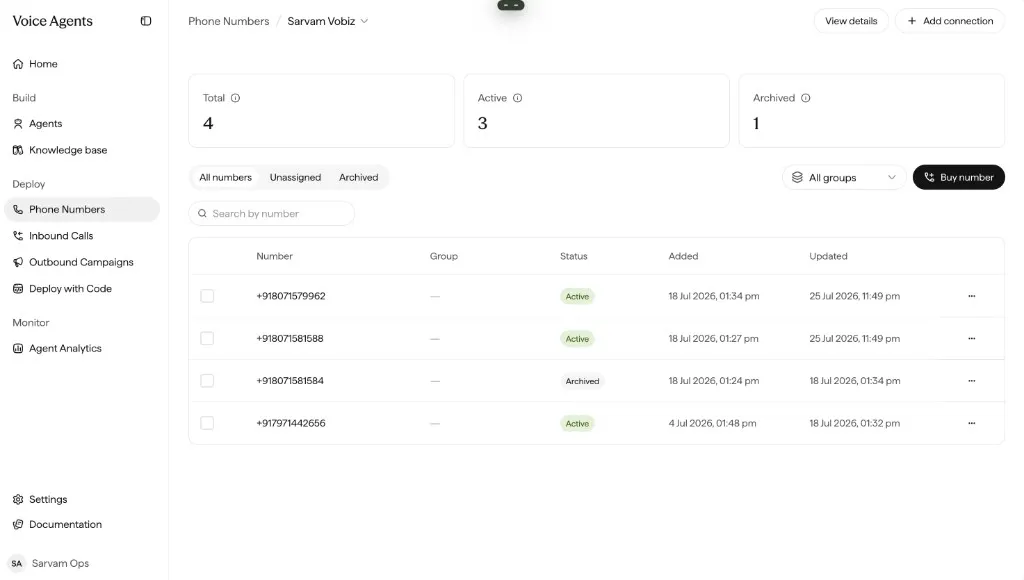
The Phone Numbers page for a Sarvam Vobiz connection, with Total/Active/Archived summary cards and a table of phone numbers.

Phone Numbers: manage connections and numbers under Deploy.

How telephony fits together

Everything builds up from a connection:

Building blockWhat it is
ConnectionThe link between Sarvam and a telephony provider. This is what actually carries your calls. You set it up once.
NumberA phone number that lives under a connection — the number people dial, or the one your agent dials from.
GroupAn optional bundle of numbers you can assign together instead of one at a time.

Once you have numbers, you decide how they’re used: Inbounds to answer incoming calls, or Campaigns to dial out to a list.

Two ways to connect

Not sure which to pick? If you don’t already run a telephony provider, Rent from Sarvam is the fastest way to get a working number. Choose Bring Your Own if you already have provider accounts and numbers you want to reuse.

Guides

Quick reference

I want to…Go to
Connect my Exotel accountExotel setup
Connect my Twilio accountTwilio setup
Connect my Smartflo accountSmartflo setup
Connect my Pulse accountPulse setup
Connect my Intalk accountIntalk setup
Connect my own Vobiz accountVobiz setup
Get numbers without a providerRent from Sarvam
Manage my numbersManage Phone Numbers
Receive incoming callsInbounds
Dial an audienceCampaigns
Bundle numbers for a campaignGroups