

Genie
Genie is the AI assistant built into Voice Agents. Describe what you want in plain language and Genie does the work on the platform for you - from drafting a new agent, to putting it live on a phone number, to launching an outbound campaign and explaining why calls didn’t connect.
Genie can only use the platform features available to your plan and workspace. If a feature (for example, workflows) isn’t enabled for your workspace, Genie will tell you it can’t do that yet.
Opening Genie
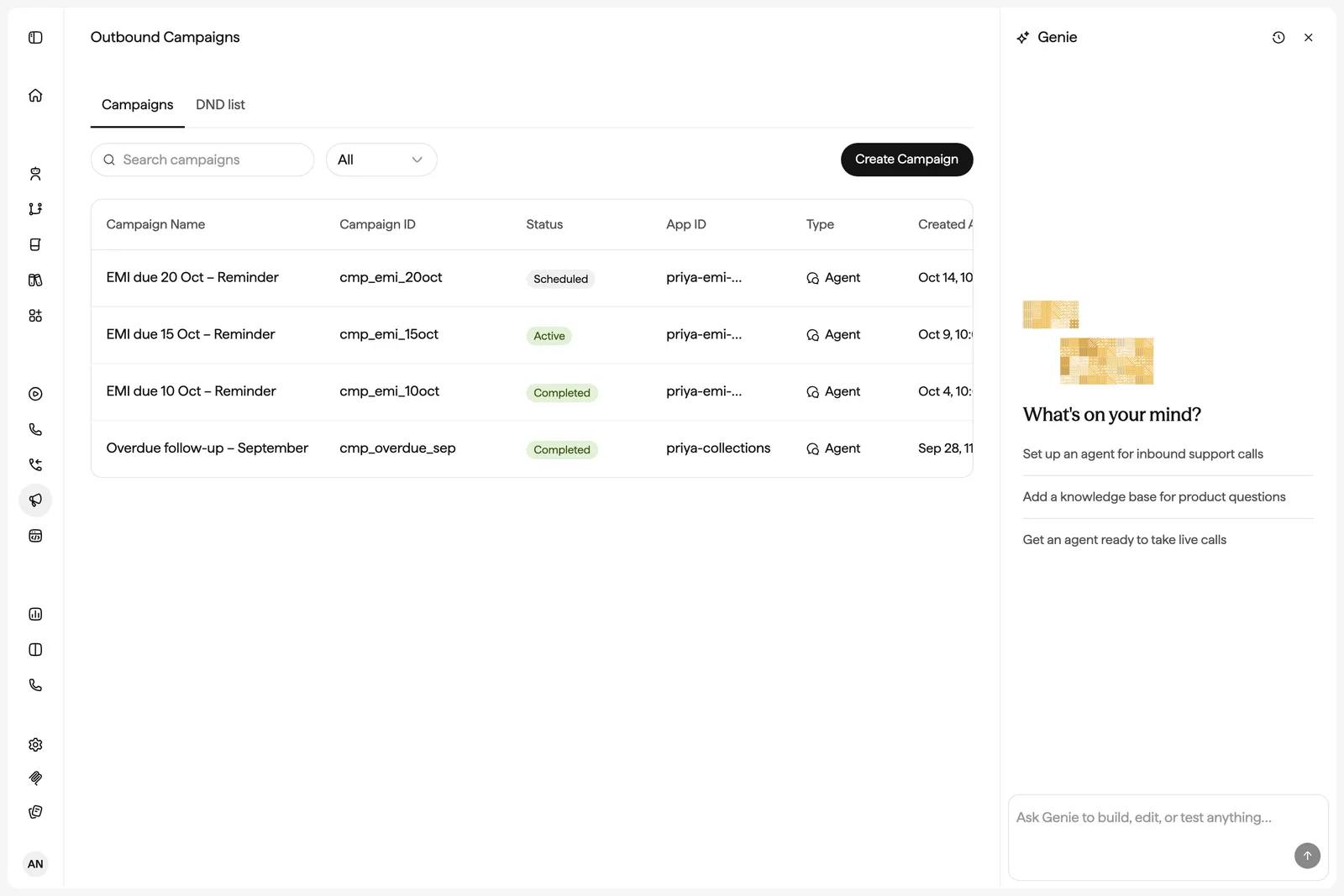
Genie lives in a panel docked to the right of every Voice Agents page. Because the panel stays open as you move between pages, one conversation can span building an agent, deploying it, and checking its calls.
There are several ways to open it:
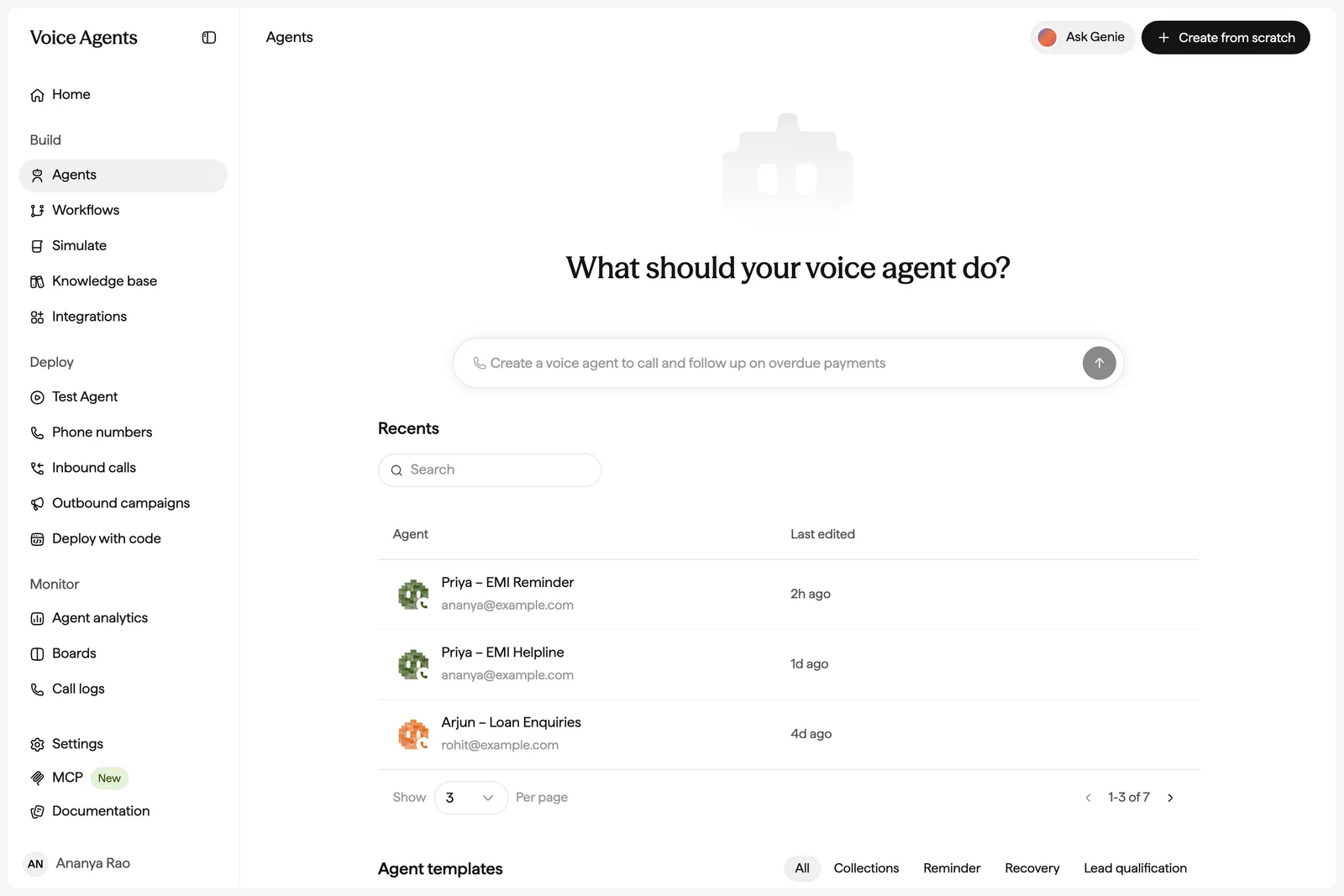
- Ask Genie - the button at the top right of the page header on Agents, Campaigns, Inbound calls, Boards, and other pages. It’s hidden while the Genie panel is already open.
- Agents home - type into What should your voice agent do? on Build → Agents. Genie creates a new agent, opens it in the editor, and starts building from your description. Use Create from scratch if you’d rather start with a blank agent.
- Improve with Genie - the button in the agent editor header. Genie and Test agent share the same side panel, so opening one closes the other.
- Customise with AI - on a template, clones it and asks Genie to adapt it to your use case.
Chats and context
- Genie knows where you are. Each message includes the page you’re on - the agent, campaign, knowledge base, or board you’re viewing - so “pause this campaign” or “why are calls failing here?” just works.
- Chats belong to your workspace, not to a single agent. Use New chat to start fresh and Chat history to search and reopen past chats. Genie reopens your most recent chat when you come back.
- Pages refresh automatically. When Genie changes something - an agent, a deployment, a campaign, a board - the page you have open updates without a reload.
- Queue follow-ups. You can type up to five more requests while Genie is working, or press Stop to cancel the current one.
- Rate any reply with Good response or Bad response to help us improve Genie.
Build and refine agents
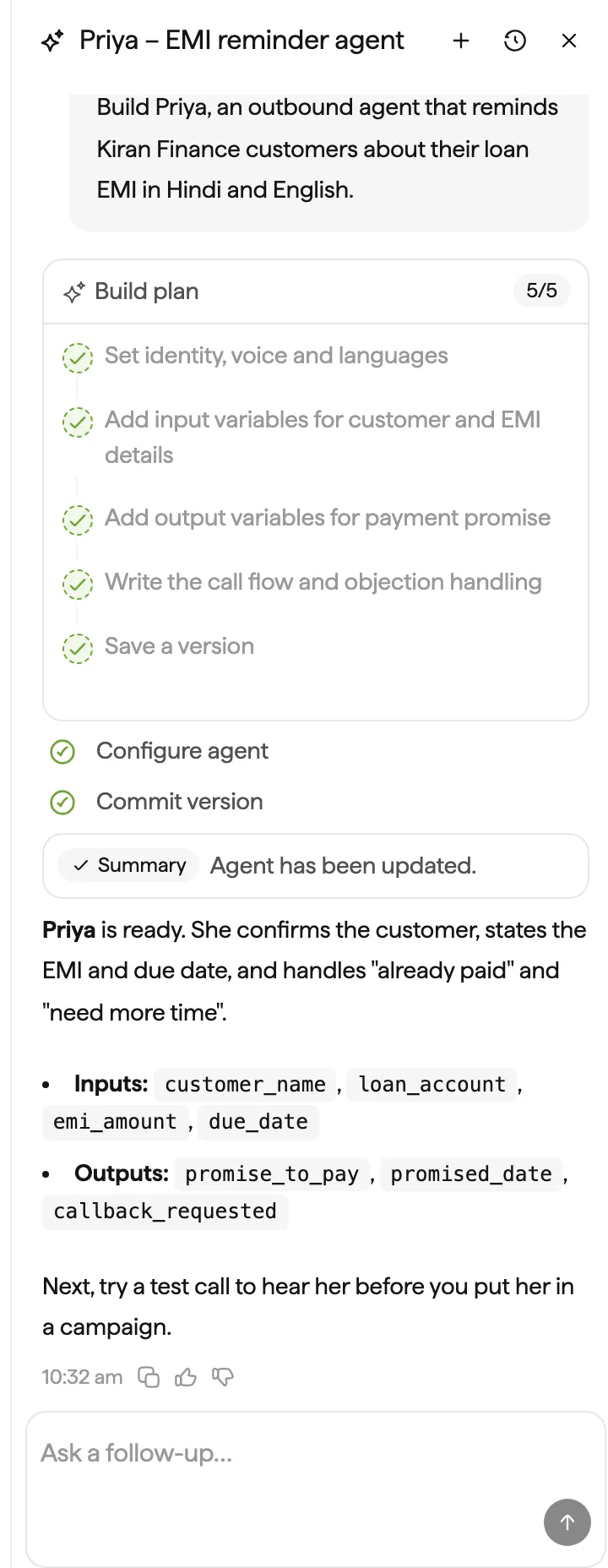
Describe the agent you want and Genie runs a guided build: it asks a few questions one at a time, shows a Build plan, and then works through it - inputs and outputs, tools, instructions, guardrails, greeting, languages, voice, call handling (voicemail and silence), and the call goal - before a final quality pass and a saved version. When the plan is done, a Plan has been executed strip appears with a Test agent button.
On an existing agent, Genie makes simple changes directly and proposes a plan for larger ones. It can:
- Rewrite or tighten the instructions and greeting, or restore the previous version of the prompt after a rewrite.
- Add or change variables, including post-call extraction (for example, “did the customer promise to pay, and when?”).
- Set up API tools through a setup card. Credentials go in a masked field and are never shown in chat.
- Configure call transfer to a human.
- Change languages, voice, pitch, and pace, and add pronunciation rules.
- Create a knowledge base from files you upload in chat and attach it to the agent.
- Create test suites and scenarios, run them, and summarize the results.
- Review the agent and resolve open suggestions on the canvas.
Example prompts
- “Create a voice agent that calls customers 3 days before their EMI is due and reminds them to pay.”
- “Make the agent speak Hindi and Tamil too, and start in Hindi.”
- “Switch to a calmer female voice and slow the pace down a little.”
- “Capture whether the customer promised to pay and the promised date after each call.”
- “Transfer the call to a human when the caller asks for one.”
- “Create a few test scenarios for angry customers and run them.”
In the editor, you can also select text in the instructions and type in Describe a change… for a targeted edit. See Navigating the build interface.
Connect an agent to a phone number
Genie can take an agent from the editor to a live phone line. It can:
- List your telephony connections and phone numbers, and manage number groups.
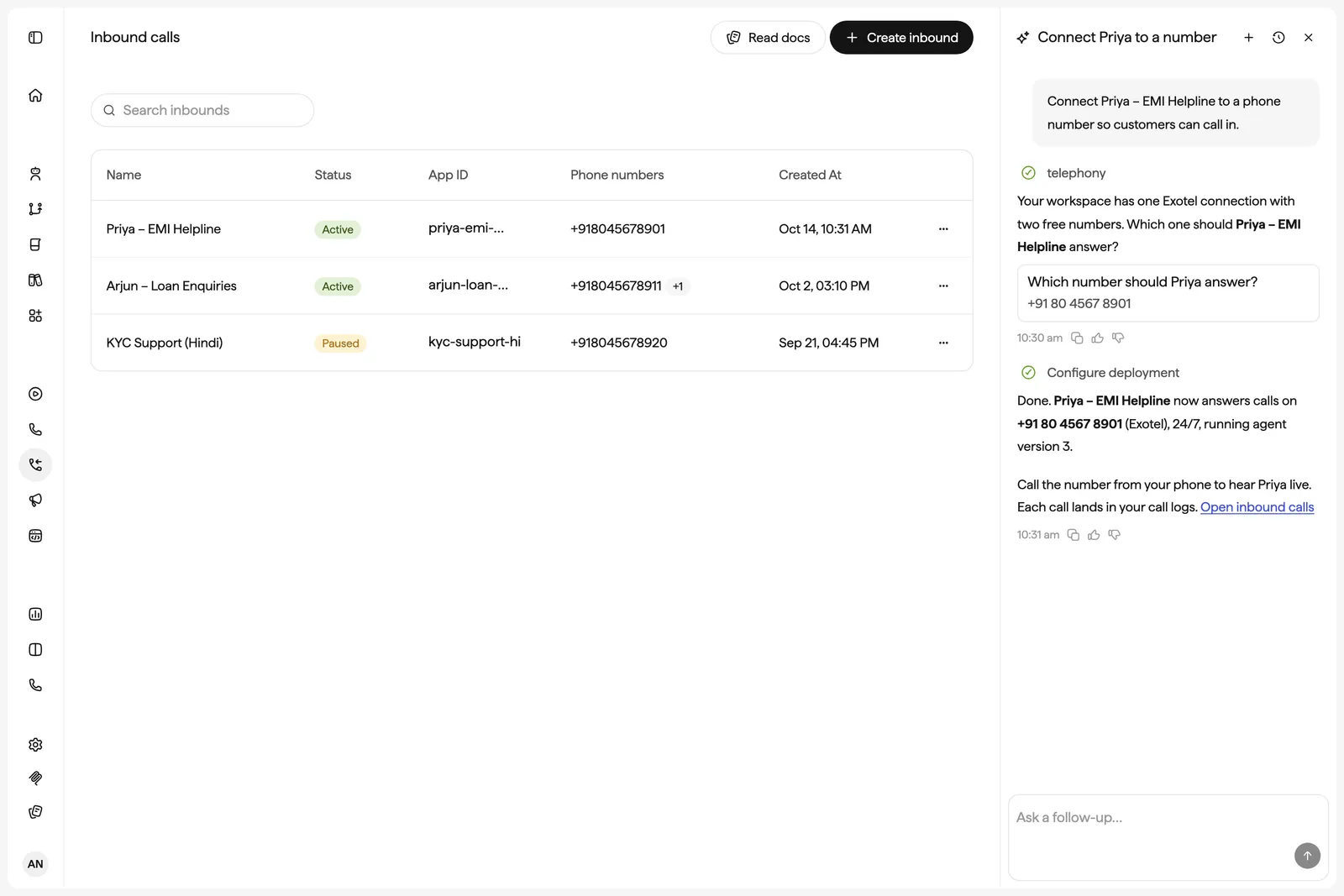
- Create an inbound deployment that puts an agent on one or more numbers, with optional answering hours (24/7 by default) and a call-end webhook.
- Pause, resume, or delete a deployment, or switch it to a newer version of the agent.
- Upload a known-callers list so the agent can greet returning callers by name.
- Place a test call to your phone. Genie first sends a one-time code by SMS to verify your number, then calls up to 10 verified numbers so you can hear the agent.
Genie asks which connection to use and then which number. It only uses numbers that are already connected to your workspace - to add new numbers, see Bring your own telephony or Rent from Sarvam.
Example prompts
- “Which phone numbers do we have connected?”
- “Put my Support Agent live on our Exotel number for inbound calls.”
- “Only answer calls Monday to Saturday, 9 am to 7 pm.”
- “Move the inbound deployment to the version I just saved.”
- “Call me so I can hear the agent.”
- “Pause the inbound line for the Collections agent.”
Deployments and campaigns always run a saved version of your agent, never the unsaved draft. A test call can use the draft. Test calls are real calls and use credits.
Create and run campaigns
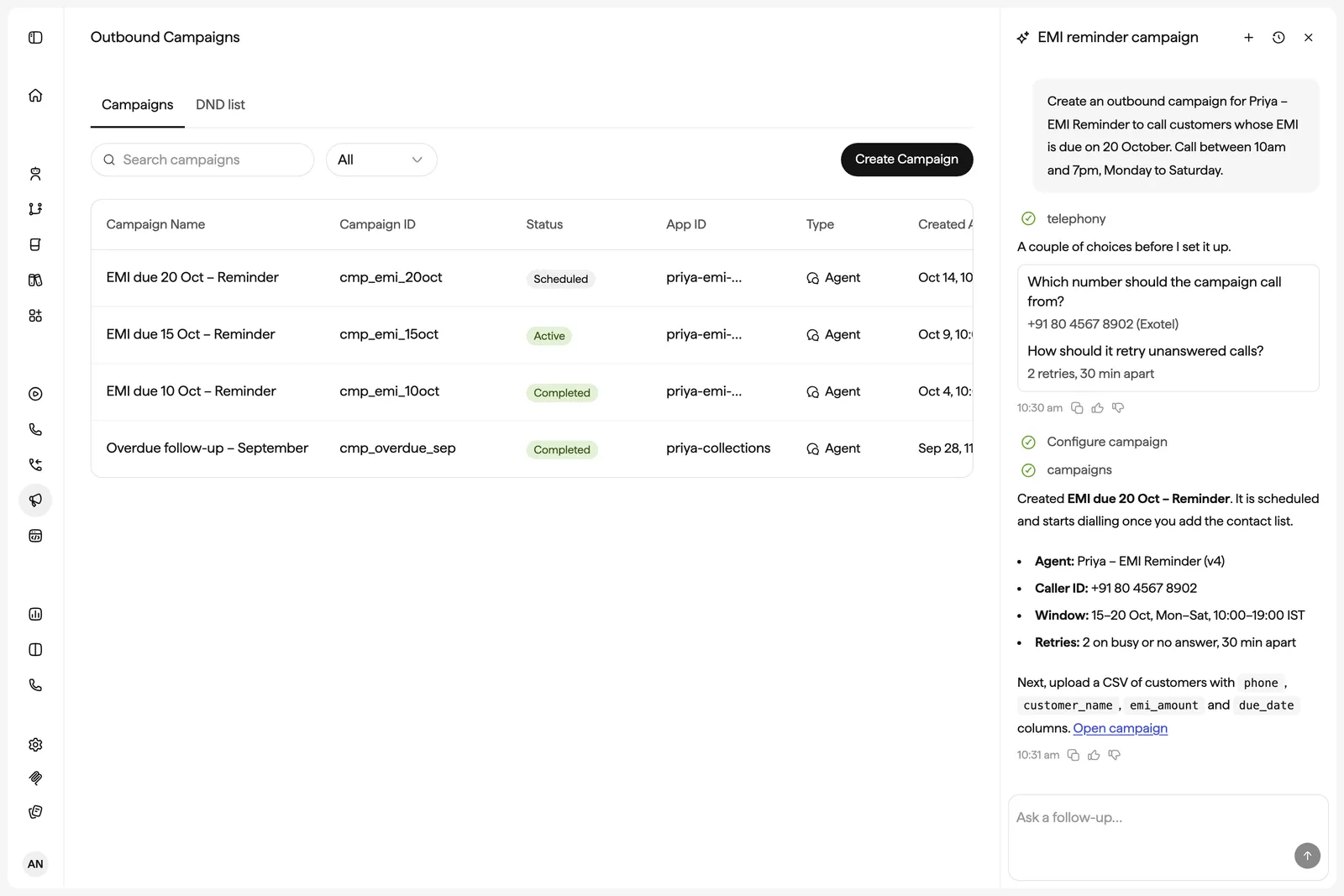
Genie can set up and manage outbound campaigns end to end:
- Create a campaign with the agent and version, caller numbers, dialing rate, retry rules (for example, retry busy and no-answer twice after 30 minutes), calling window (days and hours, in IST by default), and start and end dates.
- Upload contacts. Share a CSV in chat and Genie maps its columns to the agent’s variables - phone number, customer name, due date, and so on. It reports how many rows were accepted and why any were rejected. See Cohorts.
- Manage the campaign - pause, resume, extend the end date, change the calling window, or cancel it.
- Webhooks - check call-end webhook deliveries and retry the ones that failed.
- Do Not Disturb - add, remove, or look up numbers on your workspace’s DND list, or import one from a CSV (where DND is enabled).
A campaign starts dialing on its schedule as soon as it’s created, so Genie always asks you to confirm before creating one.
Example prompts
- “Set up an outbound campaign for the EMI reminder agent, calling weekdays 10 am to 6 pm.”
- “Dial at 1 call per second and retry busy and no-answer twice after 30 minutes.”
- “Here’s the contact list. The phone column is ‘mobile’ and ‘name’ is the customer name.”
- “How many rows were rejected from the upload, and why?”
- “Pause the March reminders campaign.”
- “Add this number to the do-not-call list.”
Analyze calls
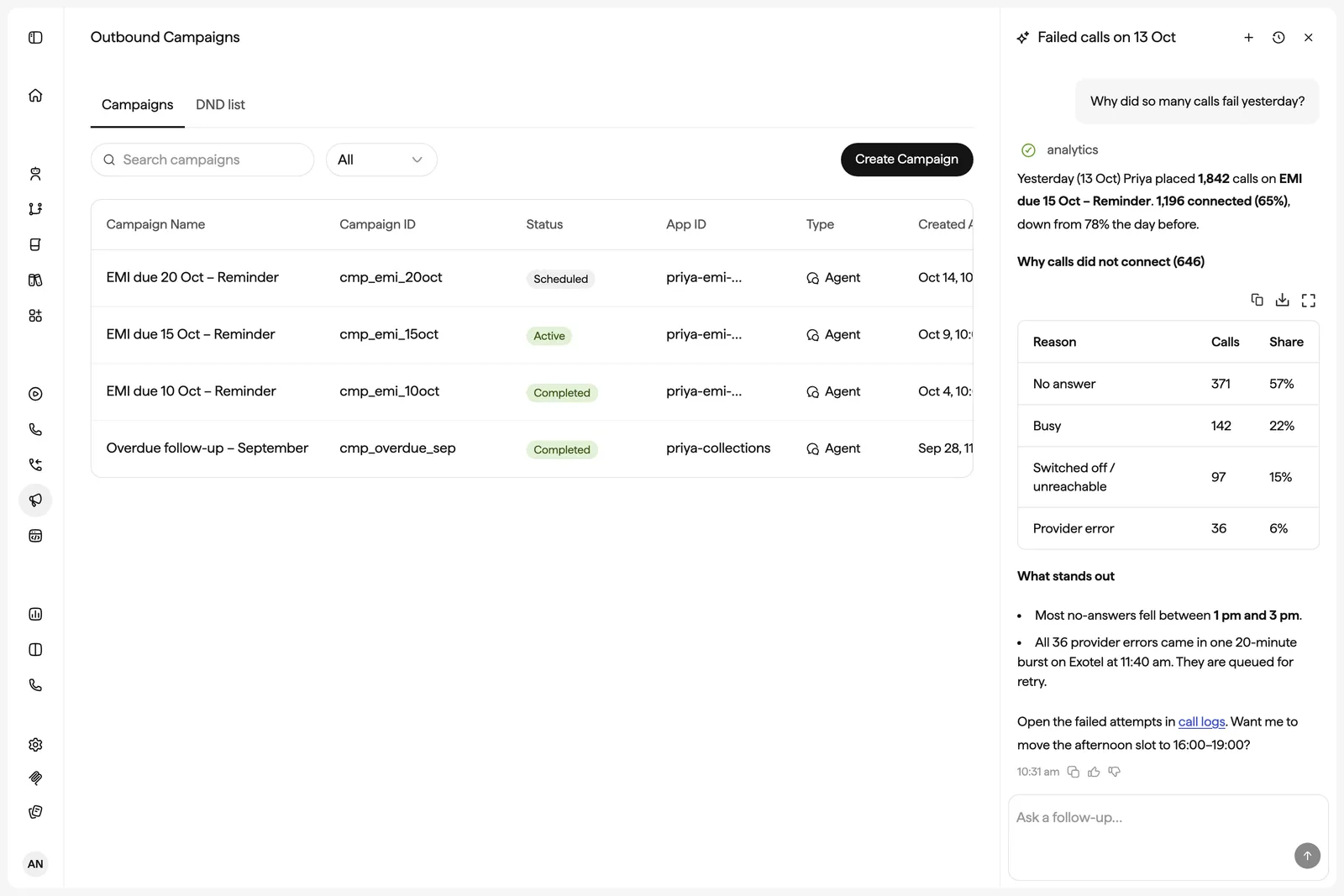
Ask Genie questions about how your agents and campaigns are performing, and it pulls the data from Agent Analytics and answers in chat:
- Performance summaries - call volume, engagement, and connect rates for an agent, several agents, your whole workspace, or a single campaign, over any date range.
- Why calls didn’t connect - a breakdown of non-connection reasons such as busy, no answer, or provider failures.
- Find calls - list calls or dial attempts that match a filter, and open a call’s transcript to explain what went wrong.
- Tool health - error rates and latency for each of the agent’s tools, and the failed calls behind them.
- Boards - for charts, Genie builds a Board with number, table, bar, or line widgets and filters, schedules regular deliveries, and exports widget data to CSV.
Genie links to the relevant pages - such as call logs or analytics - so you can dig deeper.
Example prompts
- “How did my collections agent do this week?”
- “What’s the connect rate for the March campaign, and why are calls not connecting?”
- “Show me calls from yesterday where the customer asked for a human.”
- “Pull the transcript of the last failed call and tell me what went wrong.”
- “Which of my agent’s tools are erroring most, and how slow is the payment lookup?”
- “Build a board with daily calls, connect rate, and average duration for the Sales agent, and email it to me every Monday.”
Confirmations and safeguards
Genie can make real changes, so it checks with you before anything that places calls, affects live traffic, or can’t be undone. It shows a question card and waits for Yes or No:
- Calls and live traffic - placing a test call, creating a campaign, switching a live deployment to a new version, or pausing a deployment.
- Permanent changes - cancelling a campaign, deleting a deployment, connection, knowledge base, file, tool, variable, test scenario, secret, or board item, and replacing most of the agent’s instructions.
- Editing a different agent - Genie can read any agent in your workspace, but it only edits the agent you’re working on or one you confirm (Yes, edit it).
If you answer No, Genie stops and won’t retry unless you ask again.
Good to know
- Genie stays on platform tasks. It won’t answer general questions, and it won’t make up business details such as prices, policies, or API endpoints - it asks you instead.
- Never paste API keys or passwords into chat. Genie asks for credentials in a masked field or uses your workspace secrets.
- Genie writes agent configuration in English, and the platform handles translation to the agent’s other languages.
- Genie can’t delete agents.
- In the agent editor, you need the edit lock to message Genie. With view-only access, you can read the chat history but can’t send messages.
- For long tasks, Genie may pause with Turn limit exceeded. Click Continue to let it keep going.