

Conversation Settings
Fine-tune turn-taking, timeouts, language behaviour, and call behaviour for voice agents. This page is the hub for the settings that shape how the agent runs a conversation.
Language personalisation
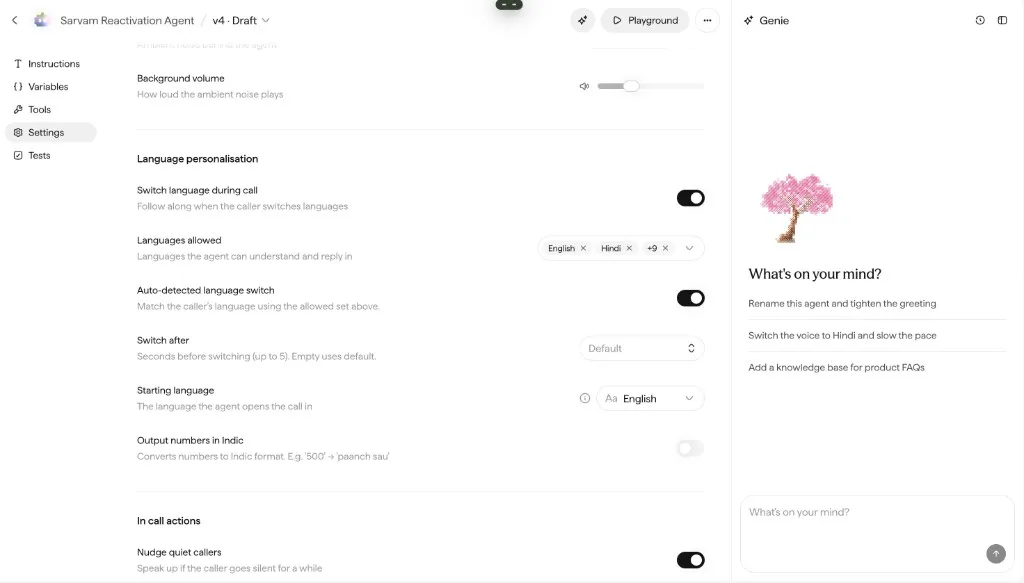
Configure language behaviour under the agent’s Settings tab:
- Starting language: the language the agent opens the call in. It can be overridden per contact in a campaign cohort, so each caller starts in their own language.
- Switch language during call (smart language switch): the agent follows along when the caller switches languages mid-call.
- Languages allowed: the languages the agent can understand and reply in.
- Auto-detected language switch: when enabled, the agent can switch based on detected speech (with a Switch after delay).
- Output numbers in Indic: converts numbers to Indic reading, for example
500becomespaanch sau. - Per-language voices: when enabled on the Speakers & voice page, the agent uses the voice persona mapped to the starting language for the duration of the call, even if the caller switches languages mid-conversation.
Pronunciations
Control how specific terms are spoken, brand names, product names, and abbreviations. Configured via the pronunciation dictionary on the Speakers & voice page.
Model temperature
The underlying model is managed internally, there is no model picker. You can tune model temperature: lower stays compliant and consistent, higher is more creative. The slider runs from Compliant to Creative, with values from 0.1 to 0.9 (default 0.3).
Knowledge bases
Select the knowledge bases the agent searches to answer factual questions. Search and pick existing bases, or use + to create a new one.
Listening
Let callers interrupt lets the caller talk over the agent while it’s speaking; the agent stops and listens. Turn it off for short compliance disclosures that must be heard in full.
Two sliders tune how interruptions are detected:
- Sound sensitivity (Low / Medium / High): how readily incoming audio counts as speech, effectively how loud a sound must be to register. Lower it on noisy lines to avoid false interruptions.
- Eagerness to respond (Patient / Normal / Eager): how quickly the agent jumps in after a pause. Eager responds faster; patient waits longer before taking its turn.
Environment
Add artificial background sound behind the agent to make calls feel more natural.
- Background sound: the ambient noise behind the agent. Options include No sound, Quiet office, Call center, and City traffic; preview with the play button.
- Background volume: how loud the ambient noise plays.
Use it sparingly on telephony, heavy ambience can hurt intelligibility on noisy lines.
Nudge quiet callers
Enable Nudge quiet callers to have the agent speak up if the caller goes silent for a while. Add one or more nudges, each with its own text and delay:
- Each nudge has a message (for example, “Sorry, I think I lost you there”) and fires after a set number of seconds.
- Add more with Add More; nudges play in order, and each can be removed.
- Use Generate translations to produce each nudge in the agent’s other languages (as with the greeting).
Hang up after unanswered nudges
Enable Hang up after unanswered nudges to end the call if the caller still doesn’t respond after the nudges.
Max call length
Max call length ends the call after a set number of minutes (up to 60). When the limit is reached, the agent wraps up and hangs up.
Voicemail
Enable Voicemail to leave a message when the agent detects a voicemail box at the receiver’s end (on outbound calls). Write the voicemail message the agent leaves; it supports variables like {{user_name}} and {{seller_name}}. See also Campaigns.
Call transfer
Under Settings → In Call Actions, enable call transfer so the agent can hand a live phone call to a human, another number, or a SIP URI. Supported end to end on Vobiz. For Exotel, contact the Sarvam team.
Advanced
Advanced settings are intended for forward-deployed engineers and ship with sensible defaults. Most agents don’t need to touch them.
- Important words: names or terms the agent should hear more accurately (ASR hotwords). Add one word at a time.
- Protect sensitive info: mask phone numbers, emails, and similar details in logs.
- Detect when the caller stops talking: improves turn-taking so the agent doesn’t cut in too early.
- Convert to multi-state: split the agent into multiple conversation states. This is a one-way operation, once converted, the agent moves to the multi-state editor and can’t be reverted to single-state.